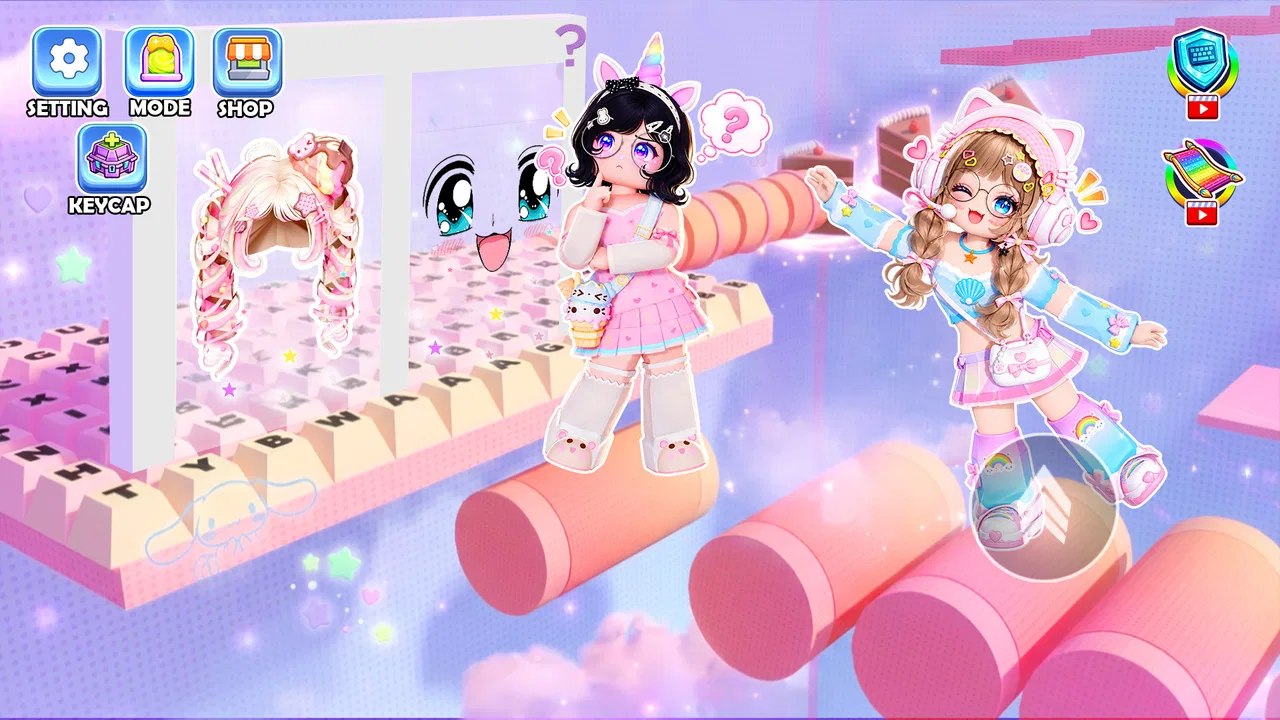
Keyboard Tower: ASMR Climb
- 4.5
- Rating
- 1.00M
- Installs
- Free
- Price

 Analysis by App-foxy
I approached Keyboard Tower: ASMR Climb expecting a small action game built around an unusual control idea, and that is exactly where its appeal begins. Instead of presenting itself as another conventional platformer with a virtual joystick, it puts the keyboard at the center of the experience: you arrange a custom keyboard setup, then use it as the foundation for climbing towers. The result is a game that feels more like a focused tactile experiment than a broad adventure.
That difference matters. If you enjoy games where the input itself is part of the entertainment, this one has an immediately recognizable identity. If you are looking for a large campaign, a deep character system, or a familiar action formula, you may find the concept narrower than expected. I found it most interesting when I treated each climb as a short concentration exercise rather than expecting a full-scale action game.
How the keyboard changes the climb
The basic idea is easy to understand, but the experience depends on how much attention you give to the setup. The keyboard is not merely a decorative menu element. It frames the climb and gives the game its central rhythm. Each jump becomes a small test of timing and placement, while the visual and clicking feedback supplies the satisfying sensory layer suggested by the title.
You May Also Like

 Blood Strike: 2.5 Anniversary
Blood Strike’s Loadouts Turn Every Drop Into a Tactical Gamble
A close look at Blood Strike’s custom loadouts: how fast access to signature weapons reshapes its battle royale rhythm, rewards preparation, and narrows the gap between fights.

 Pandora - Music & Podcasts
Pandora’s Music Is Easy to Start, but Harder to Recover
Pandora’s strength is its low-effort path from a seed to a station. Its weak spot is how much confidence it asks you to place in connection, setup, and quiet recovery.

 8 Ball Pool
 Is Built on Rivalries, Rematches, and Routine
A close look at the rivalries, rematches, shared routines, and unanswered safety questions that turn a quick pool match into a persistent mobile community.

 Samsung Music
’s Quiet Strength Is Playing What You Already Own
Its reach comes less from spectacle than from dependable access to a personal library. That simplicity is both the app’s strongest retention engine and its ceiling.

 AccuWeather: Weather Radar
AccuWeather Review: A Quick, Clear Forecast for Everyday Decisions
For everyday plans, the best forecast is the one you can understand quickly. AccuWeather makes rain timing, radar, and local conditions easy to act on, with a few trade-offs.

 Hill Climb Racing
Why Hill Climb Racing Still Turns Crashes Into One More Run
A tiny car, a bumpy hill and one more upgrade: Hill Climb Racing keeps resurfacing because its simple chaos makes every near-miss feel personal.
More From Our News Desk



I liked that the game does not need a complicated story to explain itself. The tower is the challenge, the keyboard is the tool, and the climb gives the session a clear objective. That makes it approachable when I only have a few minutes. I can start without learning a large collection of abilities or memorizing a complicated control scheme.
At the same time, the simplicity creates a responsibility for the controls to feel precise. In an action game based on jumping, even a small delay or unclear response can make a mistake feel unfair. My advice is to spend the first sessions learning the relationship between the keyboard arrangement and the character’s movement instead of immediately chasing the highest possible climb. That early adjustment makes later attempts feel more deliberate.
The custom keyboard setup is also the feature most likely to separate this game from ordinary mobile platformers. A typical alternative gives you a fixed layout and asks you to adapt. Here, the setup itself becomes part of the interaction. That can make the game feel more personal, but it also means players who prefer instant, standardized controls may find the opening less direct.
A useful way to approach the setup
I would begin with a layout that feels visually simple rather than trying to make it elaborate. A crowded or unfamiliar arrangement can make it harder to understand whether a failed jump came from poor timing, a confusing position, or an incorrect input. Once the basic movement feels natural, experimenting with the keyboard becomes more meaningful.
This is one of the game’s less obvious strengths: the setup can act as a learning tool. Instead of viewing customization as something to finish before playing, I treated it as a way to isolate problems. If a particular arrangement made jumps easier to read, I kept it for practice. If it made the action look attractive but slowed my reactions, I changed it. That trade-off between appearance and usability is more important here than it would be in a standard menu-driven game.
The sensory feedback also works best when I play in short, focused sessions. Repeated clicking and movement can be calming when the climb is going well, but the same loop can become tiring if I continue after my concentration has dropped. A short break often helped more than forcing another attempt. This is not a game I would recommend treating like an endless grind unless you genuinely enjoy repeating the same type of challenge.
Progress feels tied to attention
Keyboard Tower is an action game, but its pressure comes less from a large battlefield and more from the possibility of losing control during a climb. The tower structure naturally makes every jump feel consequential. As I progressed, I became more careful about reading the next position before acting, rather than reacting to each moment at the last second.
That creates a pleasant tension. The game can feel relaxing when I settle into its rhythm, yet it still asks for accuracy. This combination is why I can imagine using it during a short break, while waiting for something, or when I want a game that occupies my hands without demanding a long narrative commitment.
There is a catch, though. A focused climbing loop has fewer ways to disguise repetition than a conventional action game. If the central jump-and-climb pattern does not hold your interest, the keyboard presentation alone may not be enough to keep you playing. I would not choose this as my main action game if I wanted varied enemies, exploration, or a constant stream of new objectives.
One practical habit helped me avoid frustration: after a failed attempt, I tried to identify one cause before restarting. Was I too fast? Did I misread the keyboard position? Did I react to the previous jump instead of preparing for the next one? That small pause turns failure into useful information. Without it, repeated attempts can blur together and make the game feel more random than it actually is.
Who is likely to enjoy it?
This game is a good match for players who like compact action challenges, unusual control concepts, and tactile feedback. It should also appeal to people who enjoy watching a simple system become more satisfying through practice. The Teen content rating makes it appropriate for an older youth and adult audience, although the rating itself does not tell me whether every player will enjoy the pressure of repeated climbing attempts.
I would especially recommend it to someone who likes games that can be understood quickly but still reward better timing. It is also a reasonable choice for a player who has grown tired of identical virtual controls and wants an input system that feels like part of the game’s personality.
I would skip it if your priority is a rich story, character progression, competitive matchmaking, or a large collection of modes. I would also be cautious if you dislike repetition or need every failure to feel clearly explained. The unusual format is its strongest selling point, but that also makes the experience more specialized than a general-purpose action title.
Fairness, spending, and what I would check before committing
The game is free to play, which makes it easy to try without making an immediate financial commitment. That is valuable for a concept this specific: you can discover whether the keyboard setup and tower climbing actually suit you instead of judging them from a few screenshots or a short description.
Still, free access should not automatically be treated as proof that the complete experience is equally generous. I prefer to judge spending fairness by asking whether payment changes access, progress, or competitive outcomes. In this case, I would not assume any particular purchase model, advantage system, or restriction without seeing it directly in the current game. The sensible approach is to play far enough to understand the core loop before considering any optional spending.
That advice is especially relevant because the game’s value is concentrated in its central interaction. If the basic climb already feels satisfying, optional extras may be pleasant rather than necessary. If the core movement does not click with you, spending more would not solve that problem. Try the free experience first, then decide whether the added value is genuinely useful to your way of playing.
Fairness also depends on whether progress reflects skill or access. A strong version of this concept should make a successful climb feel earned through timing, attention, and familiarity with the setup. If an advantage can simply be purchased, that would weaken the satisfaction of mastering the keyboard and tower. I cannot responsibly claim that the game has or lacks such a system, so I would pay attention to how your own progress develops during normal play.
For a competitive-minded player, that distinction is crucial. A personal challenge can tolerate cosmetic variation or convenience, while a leaderboard-focused experience needs a much clearer separation between skill and spending. Before investing serious time, I would look for whether other players are being measured under comparable conditions. That is a better fairness test than assuming that every free action game follows the same rules.
How it compares with familiar alternatives
Compared with a traditional mobile platformer, Keyboard Tower has a more distinctive identity but a narrower range of activity. Conventional platformers usually offer familiar movement, so they are easier to pick up and compare. This game asks you to learn its own relationship between keyboard arrangement, clicking, and jumping. That extra learning step is also what makes it memorable.
Compared with an endless runner, it appears more deliberate. Endless runners often emphasize automatic forward motion and quick reactions, whereas this climbing concept encourages me to think about the next move and the structure in front of me. Players who enjoy planning a jump may prefer it; players who want constant speed may find it less exciting.
It also differs from a conventional relaxing or ASMR-style app. The sensory feedback is connected to action and risk, not just passive tapping. When the climb is going well, that connection can be satisfying because the sound and clicks reinforce what I am doing. When I make repeated mistakes, the same feedback does not remove the underlying pressure. This is relaxation with a performance element, not a purely soothing experience.
That comparison helps explain the game’s best use case. I would not replace a full platform adventure with it, but I could easily keep it as a compact alternative for short sessions. It fills the space between a reflex challenge and a tactile toy, provided the keyboard-centered design appeals to me.
Questions I would answer before downloading
Will it work on an older device? The listed minimum operating system is Android or iOS version 10, so users should check that their device meets this requirement before installing. That requirement is broad enough to include many older phones and tablets, but compatibility also depends on the individual device and its current software condition.
Is it a large, established release? The game has passed one million installs and holds an average rating of four and a half from roughly four thousand seven hundred ratings. Those figures suggest that the concept has reached a substantial audience and that the overall response is positive, while the relatively small review count means I would still treat detailed written opinions as limited rather than assuming every experience is identical.
Who maintains it? The developer is listed as lehieu.0405tk. I would keep that name in mind when checking future updates or support information, especially because a game built around an unusual control idea benefits from clear maintenance and responsive handling of device-specific issues.
What version should I expect? The current version is 1.0.9. That tells me the game has an identifiable current build, but I would not read a version number as a promise of a particular feature roadmap. For practical purposes, I would install the latest available build and test the controls before forming a final opinion.
Is it suitable for everyone? It carries a Teen age rating, so I would not present it as a children’s game. The rating should guide families when deciding whether the title fits a younger player, while adults and older teens can focus more on whether the action loop and tactile presentation match their preferences.
My trust verdict
After looking at the game as both an action title and a free-to-try experiment, I see a clear reason to recommend it: the keyboard is not an afterthought. It gives the climbing loop a recognizable character and creates a more hands-on relationship with movement than I usually get from a standard mobile platformer.
I also would not oversell it. The game’s appeal depends heavily on whether you enjoy repeating a focused climb, adjusting your approach, and learning through small mistakes. It is not the obvious choice for someone who wants a broad action package, and I would not assume that free access guarantees unlimited value or perfect competitive fairness without examining the in-game experience personally.
My practical recommendation is to try it with modest expectations. Give the keyboard setup time, use short sessions, and judge the game by how satisfying the controls feel rather than by the novelty of the premise alone. If the clicks, jumps, and tower pressure begin to form a rhythm, Keyboard Tower: ASMR Climb can become a distinctive little action game for focused breaks. If that rhythm never arrives, there is no reason to force it when more traditional platformers will offer a broader and more familiar experience.
FAQs for Keyboard Tower: ASMR Climb
01What is Keyboard Tower: ASMR Climb?
Keyboard Tower: ASMR Climb is a casual climbing game built around a distinctive keyboard-themed concept. You guide a character upward through a tower while interacting with keys, platforms, and obstacles. Its main appeal is the combination of simple tap-based gameplay, satisfying ASMR-style keyboard sounds, colorful visuals, and short sessions that are easy to enjoy when you want a relaxing but lightly challenging mobile game.
02How do you play Keyboard Tower: ASMR Climb?
The game is designed to be easy to understand, even for first-time players. You generally tap or interact with on-screen controls to help your character climb higher, avoid hazards, and land safely on the next section of the tower. Timing is important because careless movements can interrupt your progress. As you advance, the layouts and obstacles become more demanding, encouraging you to improve your rhythm and precision.
03Is Keyboard Tower: ASMR Climb suitable for children?
Keyboard Tower: ASMR Climb is generally suitable for players who enjoy simple arcade and casual games, including many younger users. The controls are straightforward and the concept is not based on violence or complicated strategy. However, parents should still check the age rating shown in their local app store, review the advertising and in-app purchase information, and consider whether the game’s sound effects and repeat-based gameplay are appropriate for their child.
04Does Keyboard Tower: ASMR Climb require an internet connection?
The core climbing gameplay may be playable without a continuous internet connection, which makes the title convenient for short sessions while traveling or when mobile data is unavailable. Nevertheless, certain features can depend on connectivity, including advertisements, promotional rewards, analytics, updates, or purchases. For the most accurate offline experience, install the latest version, launch the game once online, and test its available modes before relying on it without internet access.
05Are there advertisements or in-app purchases in Keyboard Tower: ASMR Climb?
As with many free-to-download casual mobile games, Keyboard Tower: ASMR Climb may include advertisements and optional in-app purchases. Ads can appear between attempts or when you choose to receive bonus rewards, while purchases may support extra items, progression, or an ad-free option depending on the version. Before downloading, check the Google Play Store or App Store listing for current pricing, billing details, and parental-control requirements.
Pros
- Simple one-touch controls make it easy to learn.
- Short levels are ideal for quick gaming sessions.
- Relaxing ASMR sounds create a satisfying atmosphere.
- Bright visuals and smooth animations are appealing.
- Progression encourages players to keep improving their height.
Cons
- Gameplay can become repetitive after extended play.
- Ads may interrupt the experience or appear frequently.
- Limited challenge may not satisfy experienced players.
- Some upgrades may require significant time to unlock.
- Performance can vary on older or less powerful devices.

Keyboard Tower: ASMR Climb
Gallery